TL;DR
Healthcare is a necessity, and at its core, every doctor’s visit, every follow-up call, every prescription renewal all of it is built on trust between patients and providers. Yet for decades, the technology infrastructure supporting that trust has been deeply fragmented. On one side, you have Electronic Health Records (EHR) systems that store clinical data, diagnoses, lab results, and treatment plans. On the other hand, you have Customer Relationship Management (CRM) platforms that manage patient communication, scheduling, and Marketing.
That’s where CRM-EHR integration comes in. When these two systems communicate in real time, healthcare organizations unlock a powerful new model: one where clinical insight and patient engagement work hand-in-hand. This guide walks you through everything you need to know, from what each system does to why integration matters and how to successfully implement them.
Key Takeaways
- CRM and EHR systems serve fundamentally different purposes but are most powerful when integrated.
- Siloed systems lead to duplicated data, missed follow-ups, and poor patient experiences.
- Integration enables personalized outreach, coordinated care, and data-driven decision-making.
- A successful integration follows eight key steps, from stakeholder alignment to ongoing optimization.
- Challenges like data standardization, HIPAA compliance, and change management must be proactively addressed.
- The ROI of integration is measurable: reduced no-shows, improved chronic care management, and higher patient satisfaction scores.
What Is a Healthcare CRM?
A healthcare CRM is the patient engagement layer of a healthcare organization. It manages non-clinical interactions such as appointment reminders, patient communication, referral tracking, outreach campaigns, feedback, and follow-up workflows.
Unlike an EHR, which stores clinical records, a healthcare CRM helps teams communicate with patients before, between, and after care episodes. When connected to an EHR, the CRM can use clinical events such as appointments, discharges, lab results, and care gaps to trigger timely, personalized engagement.
Key Functions of a Healthcare CRM
• Appointment scheduling and automated reminders
• Patient segmentation by demographics, conditions, or care gaps
• Personalized outreach campaigns for preventive care and wellness programs
• Referral tracking and management
• Patient satisfaction surveys and feedback collection
• Care gap identification and proactive outreach
• Call center and patient communication logs
What Is an EHR (Electronic Health Record)?
Think of an EHR, an Electronic Health Record, as a patient’s complete medical story in one place. It holds everything clinically relevant: their history, diagnoses, current medications, allergies, lab results, imaging reports, treatment plans, and notes from their care team.
When it comes to connecting a CRM with an EHR, the EHR brings the clinical context to the table. That context matters; it helps engagement teams reach out at the right moment, with the right message. So when something meaningful happens on the clinical side, like a patient being discharged, missing a follow-up, receiving a new lab result, or getting a referral, the CRM picks up on that signal and kicks off the appropriate next step, whether that’s a reminder, some relevant education, or a care coordination touchpoint.
Key Functions of an EHR
• Medication management and e-prescribing
• Lab and diagnostic imaging ordering and results
• Allergy and adverse reaction tracking
• Clinical decision support and alerts
• Billing and revenue cycle integration
• Care coordination across departments and specialties
• Patient portal for accessing medical records
EHR–CRM Integration: What Changes When They Work Together?
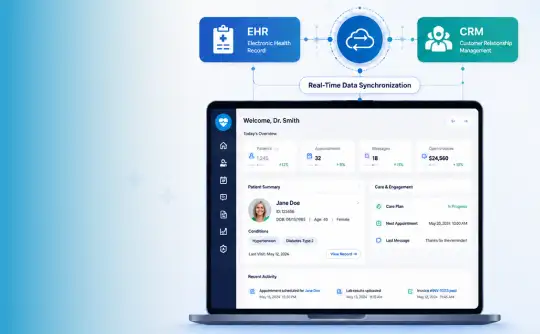
CRM and EHR systems serve different purposes, but integration changes how healthcare teams use both. The EHR records what happened clinically. The CRM determines what communication or workflow should happen next.
When the two systems are integrated, clinical events can automatically trigger engagement workflows. For example, a discharge event in the EHR can trigger a post-discharge follow-up in the CRM. A missed appointment can trigger a reminder sequence. A care gap can trigger preventive outreach.
This is the real value of EHR–CRM integration: it turns clinical data into timely, coordinated patient communication.
| Area | CRM | EHR | Integrated EHR–CRM |
|---|---|---|---|
| Primary role | Patient engagement | Clinical documentation | Connected care and communication |
| Main users | Marketing, front office, care coordinators | Doctors, nurses, clinicians | Clinical, admin, and engagement teams |
| Data type | Communication, preferences, campaigns, referrals | Diagnoses, medications, lab results, care plans | Clinical events + engagement workflows |
| Main outcome | Better patient communication | Accurate clinical records | Timely, personalized, coordinated care |
What Happens When CRM and EHR Systems Are Not Integrated?
When CRM and EHR systems operate separately, patient information becomes fragmented. Clinical data stays inside the EHR, while communication history, appointment reminders, referral follow-ups, and campaign activity remain inside the CRM.
This creates manual work for staff and a disconnected experience for patients. Teams may duplicate data entry, miss follow-ups, send outdated messages, or make decisions without the full patient context. Patients may repeat the same information across departments, while care teams struggle to see both the clinical and engagement history in one place.
EHR–CRM integration solves this by allowing relevant data to move securely between systems, so communication workflows can be triggered by real clinical events.
What Data Should Flow Between CRM and EHR Systems?
A successful EHR–CRM integration does not mean every data field must move between the two systems. The goal is to exchange the right data for the right workflow while protecting sensitive patient information.
Common data flows from EHR to CRM include appointment status, discharge events, referral orders, lab result availability, care gaps, diagnosis categories, and follow-up requirements. These events help the CRM trigger reminders, education, surveys, and outreach campaigns.
Common data flows from CRM to EHR include patient communication preferences, appointment confirmations, referral source details, feedback responses, consent status, and care coordination notes. This gives clinical and administrative teams better context without forcing duplicate entry.
| Data Flow | Examples | Why It Matters |
|---|---|---|
| EHR to CRM | Appointments, discharges, referrals, lab result availability, care gaps | Triggers timely patient communication |
| CRM to EHR | Communication preferences, confirmations, feedback, consent status | Gives care teams better patient context |
| Bidirectional | Patient demographics, contact details, appointment updates | Keeps both systems accurate and consistent |
EHR–CRM Integration Roadmap: 8 Steps for Healthcare Organizations
EHR–CRM integration should be treated as a strategic interoperability project, not just a software connection. The goal is to create reliable, secure, and workflow-ready data exchange between clinical and engagement systems.
Integration isn’t something you complete once and forget; it’s an evolving process. Organizations that succeed don’t treat it as just a technical task but as a strategic initiative that requires alignment, planning, and continuous improvement. When done right, it not only connects systems but also improves patient experiences and operational efficiency. Here’s how to approach it step by step:
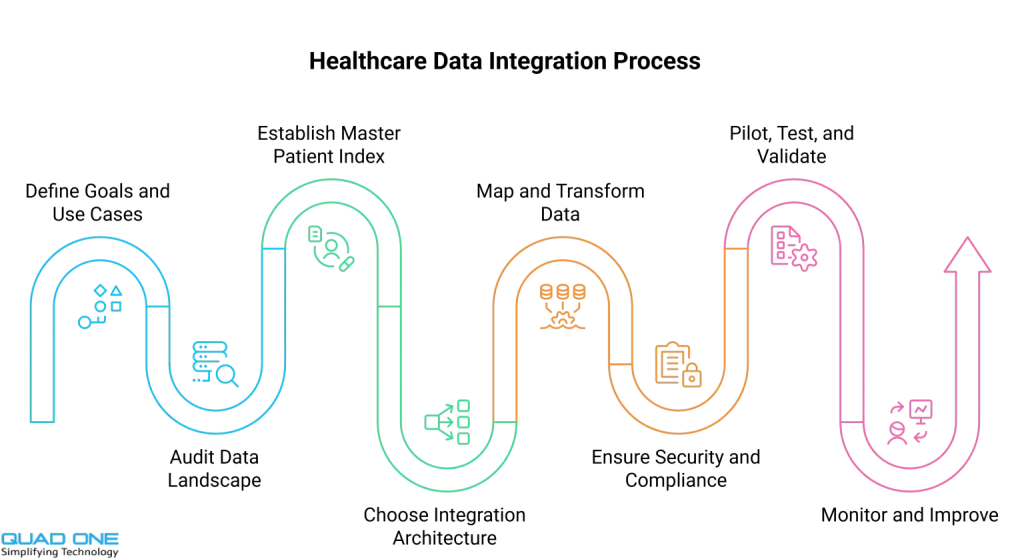
1. Define Your Goals and Use Cases
Before getting into technology, be clear about what you want to achieve. Whether it’s reducing no-shows, improving patient follow-ups, or streamlining referrals, your goals should guide everything that follows.
- Identify key business and clinical outcomes.
- Align teams across departments.
- Prioritize use cases
- Set clear success metrics.
2. Audit Your Data Landscape
Understanding your data is critical before integrating anything. Take time to evaluate what exists, where it lives, and how reliable it is.
- Review the CRM and EHR data field.s
- Identify gaps and overlaps
- Check for duplicates and inconsistencies
- Improve data quality upfront
3. Establish a Master Patient Index (MPI)
A reliable patient identity is the backbone of integration. The MPI ensures that records across systems refer to the same individual.
- Create a unified patient identi.ty.
- Use multiple identifiers for matching.
- Reduce duplicate records
- Ensure accurate data linking.
4. Choose the Right Integration Architecture
For most healthcare organizations, this means evaluating APIs, HL7 interfaces, FHIR-based integrations, middleware, or iPaaS platforms based on system maturity and scalability needs.
- Evaluate APIs, middleware, or iPaaS solutions.
- Avoid fragile point-to-point integrations.
- Use standards like FHIR.
- Plan for scalability
5. Map and Transform Data Fields
Integration isn’t just about moving data; it’s about making it meaningful. Proper mapping ensures the right information flows correctly between systems.
- Define the data flow between systems.
- Translate clinical codes into a usable format.s
- Ensure consistency and accuracy
- Document all mappings
6. Ensure Security and Compliance
Handling patient data means prioritizing privacy and security at every step. Compliance should be built in from the start.
- Encrypt data in transit and at rest
- Implement role-based access controls
- Maintain audit logs
- Align with HIPAA requirements
7. Pilot, Test, and Validate
Testing helps catch issues before they impact real workflows. A controlled rollout ensures smoother adoption.
- Use a staging environment
- Test real-world scenarios
- Involve end users
- Run a pilot before scaling
8. Monitor and Continuously Improve
Integration doesn’t stop at go-live. Ongoing monitoring and optimization ensure long-term success.
- Track performance metrics
- Fix errors and mismatches quickly
- Review outcomes regularly
- Continuously refine the system
Benefits of EHR-CRM Integration for Healthcare Organizationsd CRM Integration
When EHR and CRM systems come together, something powerful happens: clinical intelligence meets patient engagement. Instead of working in silos, teams get a connected view of both care delivery and patient interactions. This not only makes day-to-day operations smoother but also highlights real EHR integration benefits, helping healthcare providers deliver more personalized, timely, and effective care.
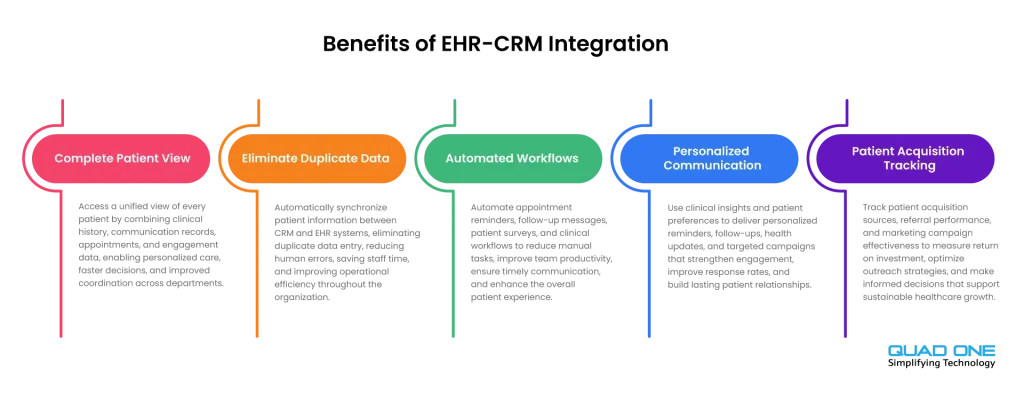
A Complete Patient View
No more switching between multiple systems to understand a patient’s journey. With integration, everything comes together in one place, from medical history to communication preferences and appointment behavior.
- Access clinical and engagement data in one view
- Understand patient behavior and care gaps
- Improve decision-making with full context
- Move from fragmented data to holistic care
No More Duplicate Data Entry
Manual updates across systems are not just time-consuming; they’re error-prone. Integration ensures that data flows automatically between CRM and EHR.
- Update information once; reflect everywhere.
- Reduce human errors and inconsistencies.
- Save time for staff
- Focus more on patient care, less on admin work.
Smarter, Automated Workflows
Connected systems can trigger actions without manual effort. This reduces delays and ensures nothing falls through the cracks.
- Automate follow-ups after visits
- Send surveys or reminders instantly
- Trigger campaigns based on clinical events
- Improve efficiency across teams
More Personalized Patient Communication
When communication is backed by clinical data, it becomes more relevant and timely. Patients receive messages that actually matter to them.
- Segment patients based on conditions or needs
- Send targeted reminders and follow-ups
- Improve engagement and response rates
- Build stronger patient relationships
Better Patient Acquisition and Referral Tracking
Integration bridges the gap between marketing efforts and clinical outcomes, giving a clearer picture of what’s working.
- Track which channels bring in valuable patients
- Measure ROI of campaigns accurately
- Optimize referral management
- Make smarter, data-driven growth decisions
How to Measure EHR–CRM Integration ROI
Healthcare organizations should measure EHR–CRM integration based on operational, patient engagement, and care coordination outcomes. The right metrics depend on the use case, but the goal is to show whether connected systems reduce manual work, improve follow-up reliability, and support better patient communication.
| Metric | What It Shows |
|---|---|
| No-show rate | Whether automated reminders and follow-ups are working |
| Referral-to-appointment time | Whether referral workflows are moving faster |
| Duplicate record rate | Whether patient identity matching has improved |
| Manual data entry hours | Whether integration is reducing staff workload |
| Follow-up completion rate | Whether post-visit and post-discharge workflows are closing |
| Patient response rate | Whether communication is more timely and relevant |
| Campaign-to-appointment conversion | Whether outreach is connected to real outcomes |
Conclusion: Integration Is the Infrastructure of Modern Healthcare
When CRM and EHR systems work together, care becomes more connected, efficient, and personal. Patients receive communication that feels timely and relevant, rather than generic or disconnected. Care teams can access and act on clinical insights without switching between systems, making it easier to deliver proactive, preventive care instead of reacting after the fact.
However, this level of integration doesn’t happen on its own. It requires clear intent, thoughtful planning, and the ability to navigate real operational and technical challenges. The steps outlined in this guide reflect lessons learned from organizations that have successfully implemented EHR CRM integration. Those who commit to the process don’t just connect systems; they create a more seamless experience for both patients and providers, ultimately delivering better, more coordinated care.