Replacing an entire Hospital Information System (HIS) can be complex, costly, and disruptive to daily hospital operations. However, hospitals do not always need to replace their existing systems to improve efficiency. They can address current limitations through software updates, the addition of new modules, better integration with other healthcare applications, and infrastructure modernization. In some cases, a phased migration to a newer system may be the right approach, allowing hospitals to upgrade specific functions gradually while keeping essential operations running. The goal is to improve existing workflows, strengthen information exchange between departments, and support better patient care without introducing unnecessary disruption.
Key Takeaways:
- Assess before replacing: Evaluate your existing HIS to identify whether software updates, new modules, better integrations, or a complete replacement is necessary.
- Prioritize interoperability: Connect laboratory, radiology, pharmacy, billing, and other hospital systems to reduce manual data entry and information gaps.
- Plan data migration carefully: Validate patient records, clinical histories, financial data, and audit trails to maintain data accuracy and continuity of care.
- Prepare for a safe go-live: Test critical workflows, train healthcare staff, establish downtime procedures, and provide post-launch support.
- Measure long-term performance: Track system availability, integration errors, staff adoption, and workflow efficiency to evaluate the success of your HIS upgrade.
What Does Upgrading a Hospital Information System Mean?
If you’re new to hospital technology, start with our guide explaining what a hospital information system is, including its modules, types and functions.
A hospital information system upgrade isn’t one single thing. Sometimes it’s a routine software update that moves the system to a supported version, improves performance, or addresses technical issues. Sometimes it means adding new capabilities, such as a billing module, patient
portal, or appointment scheduling feature. In other cases, HIS modernization involves updating the underlying architecture so the system can exchange information more effectively with
laboratory, radiology, pharmacy, and electronic health record systems. If the existing platform can no longer meet the hospital’s needs, replacing it with a new system may be necessary.
Each approach involves different costs, timelines, technical requirements, and levels of operational risk. While a routine update may require minimal disruption, a complete system replacement can involve data migration, staff training, and changes to established workflows. Before deciding on a replacement, hospitals should assess whether software updates, new modules, improved integrations, infrastructure modernization, or a phased migration can address their current challenges. The right approach depends on the limitations of the existing system, the hospital’s operational needs, and its long-term technology goals.
When Should a Hospital Upgrade Its Existing HIS?
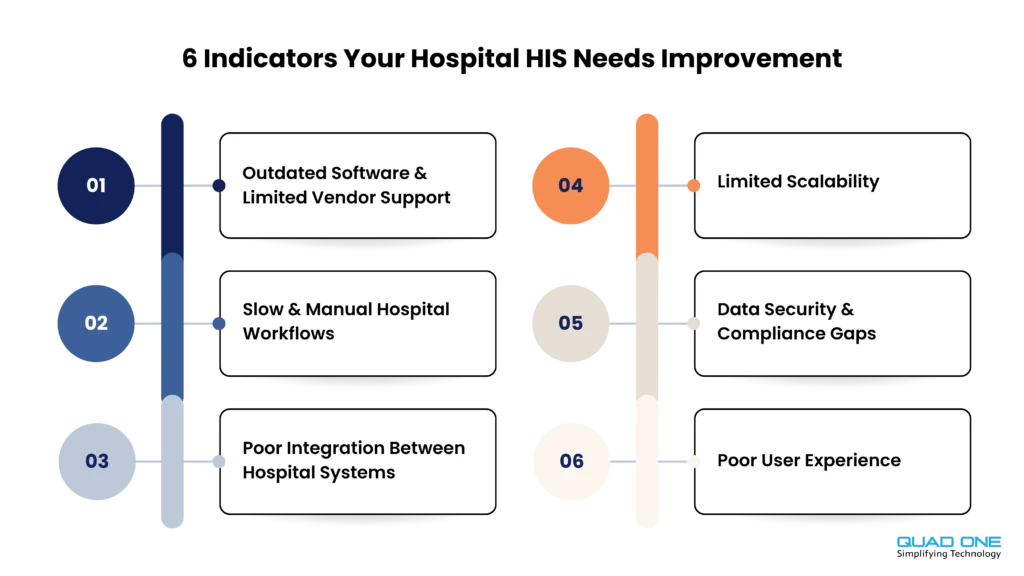
Most hospitals don’t need a consultant to tell them something is wrong. The signs are usually visible on the ground. Here are the six most common ones.
Outdated Software and Limited Vendor Support
If your HIS runs on a version the vendor no longer supports, you carry risk every day. Security patches arrive late or not at all, bug fixes stall, and even small changes become hard to make. Ask your vendor plainly which version you’re on, how long it will be supported, and what happens after that. Unsupported software is one of the clearest signs that a hospital software upgrade can’t wait.
Slow and Manual Hospital Workflows
Watch for the same patient details being typed into three different screens, registration queues that keep stretching, billing that lags behind treatment, and reports someone still compiles by hand at month-end. When staff spend more time feeding the system than caring for patients, it’s the workflow that needs fixing, not the people.
Poor Integration Between Hospital Systems
A hospital rarely runs on one system. EHR, LIS, RIS/PACS, pharmacy, CRM, and billing all need to share information. If results are re-keyed by hand, or data sits in one system while the doctor looks in another, integration is the bottleneck. This is where HIS modernization often delivers more value than a brand-new platform.
Limited Scalability
A new branch, an extra department, fifty more beds, a growing number of users. If each of these slows the system down or forces expensive workarounds, your HIS has probably hit its ceiling. Scalability problems tend to creep in quietly, then show up all at once during a busy season.
Data Security and Compliance Gaps
Check the basics. Can you control who sees what? Are audit logs complete and easy to review? Are backups actually tested, not just scheduled? Do privacy controls match how patient data is really used? Gaps here aren’t just IT problems. They affect patient trust and regulatory standing.
Poor User Experience
When screens are cluttered, entries are repeated, and staff invent their own workarounds, such as paper notes or personal spreadsheets, the system is quietly working against the hospital. Workarounds also mean important data ends up in places it shouldn’t.
If your hospital recognises one or two of these signs, that doesn’t automatically mean starting over. A system showing a single weak spot may need targeted improvements, not complete replacement. The next section helps you tell the difference.
HIS Upgrade vs HIS Replacement: Which Is Better?
This is the decision that shapes everything else, so it’s worth slowing down. The table below lays out the main options.
| Approach | When it makes sense | Typical action |
| Software/version upgrade | The current HIS works well but runs an older supported version | Update software and compatible infrastructure |
| Module enhancement | Only certain features are missing | Add modules or improve existing workflows |
| Integration modernization | The core system works but cannot communicate efficiently | Introduce supported APIs, middleware, or interfaces |
| Infrastructure modernization | The application remains suitable, but hosting or performance is limiting | Upgrade infrastructure or consider supported cloud deployment |
| Complete HIS replacement | The system is unsupported, incompatible with essential requirements, or fundamentally unsuitable. | Plan vendor selection, migration, and a controlled transition |
Behind each option is a business and operational decision, not just a technical one. A version upgrade is usually the lowest-risk move, but only if the underlying product still fits your needs. Module enhancement suits hospitals with a solid core and one clear gap, and it spares everyone from relearning the whole system. Integration modernization makes sense when the data exists but doesn’t flow, and it’s often the most cost-effective way to improve daily work.
Infrastructure modernization can fix performance problems without touching the application. A supported cloud deployment can be a good choice, but it isn’t automatically better than well-run on-premises hosting. HIS replacement is the biggest commitment of all. It brings the most disruption, the heaviest data migration effort, and the longest timeline, so it makes sense only when the current system is truly unsupported or unfit. And a new vendor isn’t a cure by default. It comes with risks of its own.
For hospitals considering custom development rather than purchasing an entirely new platform, our healthcare software development guide explains the broader development process and technology considerations.
How to Upgrade Your Hospital Information System: A 10-Step Process
The National Accreditation Board for Hospitals & Healthcare Providers (NABH) offers an HIS/EMR digital toolkit organised around planning, implementation, and post-go-live activities. The following ten steps provide a practical roadmap for hospitals planning an HIS upgrade.
Step 1: Assess Your Existing HIS
- Review current software versions, modules, integrations, infrastructure, and support agreements.
- Identify workflow issues, duplicate patient records, and incomplete data.
- Determine which existing functions work well and which need improvement.
Step 2: Define Upgrade Goals and Priorities
- Set clear goals, such as reducing duplicate data entry, improving system availability, or connecting diagnostic systems.
- Prioritise upgrades based on clinical needs, operational challenges, and available resources.
- Establish measurable outcomes to evaluate the upgrade.
Step 3: Build an HIS Upgrade Team
- Involve IT teams, hospital administrators, doctors, nurses, laboratory staff, pharmacy teams, and billing personnel.
- Assign responsibilities and decision-making authority.
- Gather feedback from staff who use the system daily.
Step 4: Choose an Upgrade Strategy and Technology Partner
- Decide whether to update the existing software, add modules, modernise the infrastructure, or replace the system.
- Evaluate vendor expertise, compatibility, integration costs, and ongoing support.
- Confirm data ownership, portability, and future scalability.
Step 5: Plan Data Migration and Backup
- Identify active and historical records that need to be retained or migrated.
- Clean duplicate records and map data fields between systems.
- Establish secure backups, recovery procedures, and data validation checks.
Step 6: Review HIS Integrations and Interoperability
- Identify connected systems, including EHR/EMR, laboratory, imaging, pharmacy, billing, and healthcare CRM platforms.
- Verify support for relevant standards and interfaces, such as HL7, FHIR, DICOM, and APIs.
- Test data exchange between systems to prevent information gaps.
For a closer look at how hospital applications exchange information, our EHR-CRM integration guide explains how clinical data and patient engagement workflows can be connected.
Step 7: Configure and Test the Upgraded HIS
- Conduct functional, integration, security, performance, and user acceptance testing.
- Test essential workflows using appropriately protected test data.
- Verify migrated records against the original system before deployment.
Step 8: Train Healthcare Staff
- Provide role-based training for doctors, nurses, front-desk teams, billing staff, and administrators.
- Appoint departmental super-users to assist colleagues.
- Establish support channels to resolve issues during the transition.
Step 9: Plan a Phased Rollout and Safe Go-Live
- Deploy the upgrade in manageable stages wherever practical.
- Define downtime procedures, rollback criteria, and responsibilities.
- Validate critical workflows, including registration, orders, laboratory results, and billing, before expanding deployment.
Step 10: Monitor Performance After the Upgrade
- Track system errors, integration failures, response times, and user adoption.
- Review support tickets and unresolved workflow issues.
- Make ongoing improvements based on staff feedback and system performance.
NHS England’s guidance on clinical system migration also highlights structured cutover planning, clear responsibilities, data verification, and post-launch support. Although developed for UK healthcare systems, these principles are relevant to hospital software upgrades in other healthcare settings.
Planning to Modernize Your Hospital Systems?
QuadOne helps assess your existing technology and improve integrations,
connect medical devices, and extend HIS workflows.
What Data Should Be Migrated During an HIS Upgrade?
Healthcare data migration is one of the riskiest parts of any HIS change, because clinical and financial records can’t simply be recreated if something goes wrong. Here’s what to verify, category by category.
| Data Category | Details to Review |
| Patient Records | Unique patient IDs, demographics, duplicate records, identity matching |
| Clinical Records | Encounters, diagnoses, clinical notes, medications, allergies, historical records |
| Appointments | Bookings, cancellations, schedules, pending appointments |
| Laboratory and Radiology | Test orders, diagnostic reports, attachments, historical references |
| Billing and Insurance | Outstanding balances, deposits, invoices, claims, financial reconciliations |
| Pharmacy and Inventory | Item masters, batch details, expiry dates, opening stock balances |
| Audit Trails and Historical Data | Retention requirements, audit trails, traceability, archived records |
You don’t always have to move everything. Many hospitals migrate the records they need for daily care and keep older ones in a secure, accessible archive. The right scope depends on clinical continuity, legal retention requirements, and what the old and new systems can each do.
What Should Hospitals Check Before HIS Go-Live?
Before switching over, run through a short readiness check. If any item is a “not yet”, pause and fix it.
• Clinical sign-off: doctors and nursing leads have approved the key workflows.
• Reconciled data: migrated records match the source, and exceptions are resolved.
• Working integrations: lab, imaging, pharmacy, billing, and other connected systems exchange data correctly.
• Tested recovery: backup and restore procedures have been tried, not just documented.
• Trained users: every department has been trained, and super-users are in place.
• Documented downtime process: staff know exactly what to do if the system goes down.
• Vendor support: response times, escalation contacts, and go-live support are confirmed in writing.
How Much Does an HIS Upgrade Cost?
There’s no honest fixed price, because scope varies so much from one hospital to another. A better way to think about it is total cost of ownership: everything it takes to buy, run, and support the system, not just the vendor’s quote.
| Cost factor | What affects the budget |
| Upgrade scope | Version update versus major modernization or replacement |
| Software licensing | Subscriptions, modules, users, and branches |
| Data migration | Volume, complexity, cleanup, and validation |
| System integration | Existing interfaces, new connectors and testing |
| Infrastructure | Hosting, servers, network and security |
| Training | Number of departments and users |
| Post-launch support | Monitoring, maintenance, vendor support and upgrades |
Timelines follow the same logic. They depend on the scope of the project, how complex the data migration is, how much testing you need, and how many hospital locations are involved. A single-site version update and a multi-branch system replacement are very different undertakings, so be wary of any plan that treats them alike.
What Should Hospitals Prioritize in an HIS Upgrade in 2026?
Whatever route you take, a few priorities matter more than ever this year. Interoperability comes first, because a hospital system that can’t exchange data cleanly will keep creating manual work. Cybersecurity is next, with sound access control, audit trails, and backups. Patient access, meaning easy appointments, results, and communication, is increasingly part of what patients expect. Add reliable reporting so leaders can trust the numbers, and a modular, maintainable architecture so you can improve one part without disturbing the rest.
For Indian hospitals, two further points deserve attention.
ABDM interoperability : Hospitals participating in relevant Ayushman Bharat Digital Mission workflows may need to review the applicable FHIR-based data exchange specifications, identity linking, and consent-based sharing requirements. It’s worth checking how well your current HIS, or a possible replacement, supports them.
DPDP readiness : Hospitals should review the applicable provisions of India’s Digital Personal Data Protection Act and Rules. The Rules were notified in November 2025 and are being brought in step by step. The Data Protection Board provisions took effect straight away, Consent Manager provisions follow in November 2026, and most operational duties, such as notices, security safeguards and breach intimation, apply from around May 2027. So not every requirement is in force today, but the lead time is for planning, and it’s sensible to confirm exact dates with your legal advisor.
AI and automation can become useful extensions later, for example in scheduling or patient communication. But they shouldn’t overshadow the real job: a safe, reliable core HIS that clinicians and administrators can trust.
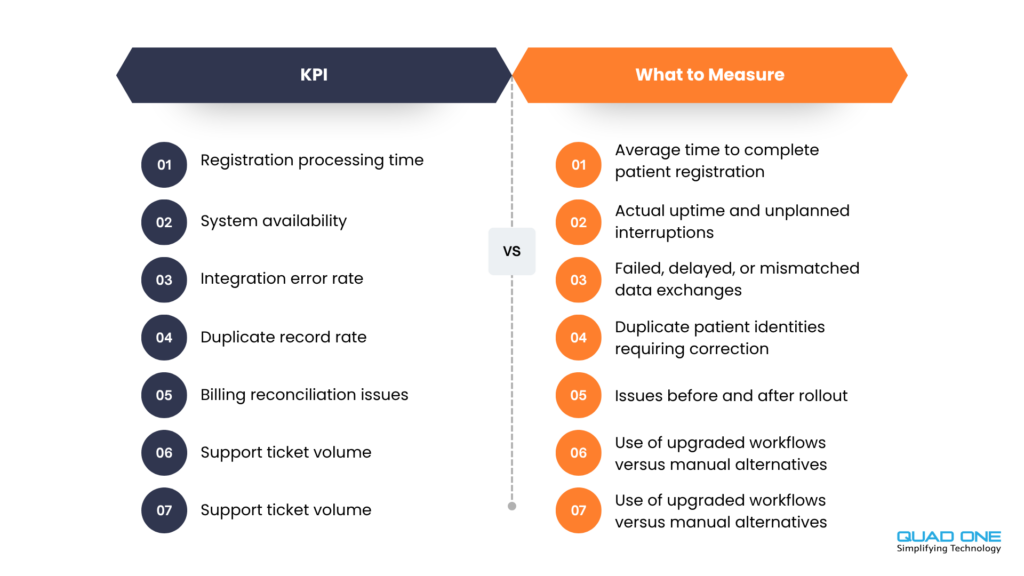
How Can Hospitals Measure HIS Upgrade Success?
Decide how you’ll judge the project before it starts. Record a baseline for each measure below, then compare after rollout. Fill in your own numbers rather than relying on generic benchmarks, since results vary widely between hospitals.
How QuadOne Supports HIS Modernization and Connected Hospital Workflows
Upgrading a hospital information system doesn’t always mean replacing the technology a hospital already uses. Sometimes the bigger opportunity is connecting existing systems, improving how information flows and introducing new patient-facing capabilities.
QuadOne helps healthcare organizations extend their existing hospital technology through application development, hospital machine integration, healthcare CRM, and AI-enabled communication solutions. With QuadOneEngage, hospitals can connect patient inquiries,
appointments, WhatsApp communication, and follow-up workflows to their existing HIS/HIMS environment. QuadOne’s hospital machine integration can also connect diagnostic equipment to hospital systems.
This approach lets you improve around your current technology while preserving the clinical and operational workflows your teams already know. If you’re weighing an upgrade against a replacement, it’s a practical place to start the conversation.
Extend Your HIS with Connected Patient Engagement
See how QuadoneEngage connects patient inquiries, bookings,
and follow-ups with your existing HIS.
Conclusion
A successful HIS upgrade starts with understanding what your hospital needs, not automatically replacing the system you already have. By assessing existing workflows, improving interoperability, planning data migration carefully, and preparing staff for the transition, hospitals can address current limitations while keeping essential operations running.
As healthcare needs evolve, the focus should remain on building a secure, scalable, and connected hospital technology environment. Whether you choose targeted enhancements, infrastructure modernization, or a phased migration, the right approach is one that supports clinical workflows, simplifies daily operations, and improves access to reliable patient information.