Every hospital depends on accurate, accessible information to deliver care and manage daily operations. Patient registration, medical records, laboratory results, prescriptions, billing, and discharge summaries all generate data that different departments need to access.
A Hospital Information System (HIS) brings these functions together on a connected platform, helping hospitals coordinate workflows, reduce repetitive administrative work, and maintain consistent patient information. This guide explores the core HIS modules, the benefits for hospitals, how integration connects the system with other healthcare technologies, and what to consider when selecting the right solution.
Key Takeaways:
- A Hospital Information System (HIS) connects clinical, administrative, and financial operations on one platform.
- HIS modules manage patient registration, appointments, medical records, diagnostics, pharmacy, billing, and reporting.
- Integrated workflows help reduce manual errors, avoid duplicate data entry, and improve coordination between hospital departments.
- Integration with systems such as laboratory platforms, imaging tools, and healthcare CRM improves information flow and patient communication.
- Security measures, including access controls, encryption, and audit trails, help protect sensitive patient information.
What Is a Hospital Information System (HIS) and Why Does It Matter?
A hospital information system (HIS) is an integrated software platform that manages a hospital’s clinical, administrative and financial data in one place. If you are asking what is a hospital information system, the simplest answer is this: it is the digital backbone that records every patient interaction, from first registration to final billing and follow-up, and keeps that data accurate, secure and available to authorised staff when they need it.
The term is sometimes confused with “health information system”, a broader label for any system that handles health data across a region or programme. A hospital information system is specific to hospital operations. It is also commonly called a hospital management system; buyers often use the two terms interchangeably, although “hospital management system” tends to emphasise administration and workflow.
In practice, an HIS typically manages:
• Patient demographics, visit history and unique patient IDs
• Clinical records, orders, test results and prescriptions
• Admissions, bed allocation, procedures and discharge
• Billing, insurance claims and payments
• Pharmacy stock, consumables and equipment
• Operational and management reports
How Does a Hospital Information System Work?
A hospital information system works by connecting software modules to a shared database. Each department uses the module built for its tasks, but every module reads from and writes to the same patient record. When the front desk registers a patient, the doctor, lab, pharmacy and billing team all see the same identity. When a doctor places an order, it reaches the right department without paperwork. This helps professionals access and exchange information, coordinate care more effectively and reduce errors, while access controls and audit trails protect sensitive patient data.
Example: Patient Journey Through an HIS
A hospital information system connects different departments throughout a patient’s journey, from initial registration and appointment scheduling to consultation, diagnosis, treatment, and billing. When an outpatient requires admission, the system links the relevant records with inpatient services, helping staff access updated information and coordinate care. The following table illustrates how an HIS supports each stage and enables information to flow between departments, reducing manual work and improving operational efficiency.
| Stage | What happens | How information flows |
| Registration | Front desk creates or retrieves the patient record and captures a unique ID, demographics and insurance details. | Patient registration system feeds the EMR, billing and appointment modules. |
| Appointment | The patient books a slot with a doctor or department through the counter, phone, website or messaging channel. | Scheduling updates doctor calendars and the OPD queue. |
| Consultation | Nurse records vitals; doctor reviews history, documents findings, orders tests and prescribes medicines. | OPD management and the EMR send orders to lab, radiology and pharmacy. |
| Diagnostic testing | Samples and scan requests are tracked; results are validated and released. | Lab and radiology results return to the patient record and post charges to billing. |
| Treatment | Medicines are dispensed, or the patient is admitted. A bed is assigned, ward notes are added and procedures scheduled. | IPD management links with bed, pharmacy and operation theatre modules. |
| Billing | Charges from every department are consolidated; insurance pre-authorisation, claims and invoices are processed. | Billing pulls services, medicines and bed days from all modules. |
| Follow-up | Discharge summary is issued; follow-up visits, reminders and feedback are arranged. | HIS holds the record; connected CRM and communication tools handle outreach. |
How information moves between departments: A hospital information system connects departments through a shared patient identity and updates information as events occur. For example, a doctor’s laboratory order can be sent electronically to the laboratory system, depending on the available integration. Once validated, the result can appear in the doctor’s view. Billing entries are generated according to the hospital’s configured billing workflow. When medicines are dispensed, the pharmacy inventory is updated based on the recorded transaction. After a patient is discharged, the bed can be marked available once cleaning and other required room-readiness steps are complete. These hand-offs can be automated when the necessary interfaces and workflows are configured.
How connected systems support the workflow : Specialised systems such as laboratory analysers, PACS imaging, payment gateways and insurance portals plug into the HIS through standard interfaces, so staff do not re-enter data. The HIS remains responsible for hospital operational and clinical records. Connected CRM and communication tools can then support patient engagement after the visit, for example appointment reminders, follow-up prompts and feedback requests, without becoming the system of record for clinical data.
Core Modules of a Hospital Information System
A hospital information system consists of interconnected modules that manage different hospital departments and their daily activities. From patient registration and clinical records to diagnostics, pharmacy, billing, and reporting, these modules share information to support coordinated workflows and efficient hospital operations.
Patient Registration System and Appointment Scheduling
This module is the entry point to the hospital. A patient registration system creates a unique patient ID, captures demographics, consent and insurance details, and prevents duplicate records. Front-desk staff, call-centre agents and, increasingly, patients themselves use it to book, reschedule or cancel appointments. It manages identity data, doctor calendars and slot availability. It feeds the OPD, EMR and billing modules, so every later transaction is tied to the correct patient.
OPD and IPD Management
OPD management handles outpatient visits: queues, consultations, vitals, prescriptions and follow-up scheduling. IPD management covers admissions, ward transfers, nursing notes, doctor rounds and discharge. Receptionists, nurses and doctors work in it daily. It manages visit records, orders, care plans and discharge summaries. Both connect to the EMR for clinical documentation, to diagnostics and pharmacy for orders, and to billing so that every consultation, procedure and bed day is charged.
Electronic Medical Records and Clinical Documentation
The EMR module is the clinical heart of the system, giving doctors and nurses a structured, searchable record of each patient. It stores history, allergies, diagnoses, progress notes, vitals, prescriptions, consent forms and discharge summaries. Clinicians use it at the point of care, and medical records staff manage it afterwards. It receives results from the lab and radiology, sends prescriptions to pharmacy and supplies coded diagnoses to billing and reporting.
Laboratory and Radiology Management
This module manages diagnostic workflows from order to report. Doctors place orders, phlebotomists and technicians track samples and scans, and pathologists and radiologists validate and release results. It manages test catalogues, sample IDs, reference ranges, images and reports. It integrates with analysers and PACS, returns results directly to the EMR, and sends billable services to the billing module so no test goes uncharged.
Connecting laboratory analyzers and diagnostic equipment with hospital systems can reduce manual data transfer. QuadOne’s hospital machine integration solutions focus on connecting medical devices with HIS and EHR platforms.
Pharmacy and Inventory Management
Pharmacists, store managers and nurses use this module to dispense medicines, track stock and control purchasing. It manages drug masters, batches, expiry dates, reorder levels, vendors and consumption data. It reads prescriptions from the EMR, flags interactions or substitutions, deducts stock on dispensing, and posts charges to billing. Alerts for low stock and near-expiry items reduce wastage and prevent shortages in wards and operation theatres.
Billing, Insurance and Revenue Cycle Management
Billing teams, insurance desks and finance managers use this module to convert care into accurate invoices and collected revenue. It manages tariffs, packages, deposits, pre-authorisations, claims, payments and outstanding balances. It automatically collects charges from OPD, IPD, diagnostics, pharmacy and procedures, supports cash, card and TPA or insurer workflows, and sends financial data to the reporting module, giving leadership a clear view of collections and claim status.
Bed, Ward and Operation Theatre Management
This module gives nursing supervisors, ward coordinators and OT managers a live view of capacity. It tracks bed status, ward occupancy, transfers, OT schedules, surgeon and anaesthetist availability, and equipment readiness. It receives admissions from IPD management, updates availability on discharge, links procedures to the patient record, and sends utilisation and turnaround data to reporting. Better visibility shortens admission waits and improves theatre usage.
Management Information System (MIS) and Reporting
Hospital administrators, department heads and finance teams use the MIS module for dashboards and reports. It draws on data from every other module: patient footfall, bed occupancy, average length of stay, revenue by department, test volumes, stock movement and claim turnaround. Configurable reports and scheduled summaries replace manual compilation, helping leaders spot bottlenecks, plan staffing and track performance against targets.
Types of Hospital Information Systems by Deployment and Scope
Hospital information systems can be classified in several ways. The most useful distinctions are:
• By deployment: On-premise systems run on the hospital’s own servers and offer direct control. Cloud-based systems are hosted by the vendor, reduce infrastructure burden and scale easily. Hybrid models keep some components local and others in the cloud.
• By scope: Standalone or departmental systems serve a single function such as a lab or pharmacy. Integrated, enterprise-wide systems cover clinical, administrative and financial workflows on one platform.
• By source: Commercial off-the-shelf products, open-source platforms and custom-built systems differ in cost, flexibility and support.
• By facility size: Clinic-level systems prioritise simplicity; multi-specialty and multi-branch hospital groups need centralised records, role hierarchies and consolidated reporting.
The right type depends on size, budget, in-house IT capability and growth plans.
Hospital information systems are one part of the wider healthcare software ecosystem. Our guide to healthcare software development explains how different clinical and operational platforms are planned, built, and maintained.
HIS vs HMS vs EHR vs CRM: Key Differences Explained
| System | Primary focus | Main users | Typical data |
| HIS | Integrated platform for hospital clinical, administrative and financial operations. | Clinicians, front desk, lab, pharmacy, billing, administrators. | Registrations, orders, results, admissions, charges, stock. |
| HMS | Often used for the same scope as HIS, with emphasis on administration and workflow management. | Administrators, front office, finance, department staff. | Appointments, billing, inventory, staffing, reports. |
| EHR | Longitudinal clinical record of a patient, often shareable across providers. | Doctors, nurses, care teams. | History, diagnoses, medications, allergies, results. |
| CRM | Patient relationship and engagement, before and after care. | Marketing, patient relations, call-centre and outreach teams. | Leads, enquiries, preferences, campaigns, feedback. |
In short, an EHR is a component of the clinical side, an HIS or HMS runs the hospital, and a CRM manages the relationship around it. They work best when integrated, with the HIS as the operational and clinical source of truth.
While HIS manages hospital operations, CRM focuses on patient engagement and communication. Our healthcare CRM software guide explains these workflows and the capabilities hospitals should evaluate.
Key Benefits of a Hospital Information System
The main hospital information system benefits span care quality, efficiency and finance:
• Safer, more coordinated care: Complete records, allergy alerts and structured orders reduce transcription and medication errors.
• Faster workflows: Digital orders and results cut waiting, duplicate entry and manual hand-offs between departments.
• Accurate billing and less revenue leakage: Charges post automatically from each service, so fewer items are missed.
• Better inventory control: Real-time stock and expiry tracking lowers wastage and prevents stock-outs.
• Data-driven decisions: Dashboards give administrators timely insight into occupancy, revenue and performance.
• Improved patient experience: Shorter queues, quicker discharge and clearer communication improve satisfaction.
• Compliance and audit readiness: Access logs, consent records and standardised documentation support regulatory requirements.
Common Challenges in Implementing a Hospital Information System
A hospital information system delivers value only when it is adopted well. Common obstacles include:
• Cost and budgeting: Licences, hardware, integration, training and support add up beyond the initial quote.
• Change management: Clinicians and staff used to paper or older tools may resist new workflows without early involvement and training.
• Data migration: Moving legacy patient and financial data demands cleaning, mapping and validation.
• Integration with existing systems: Lab analysers, imaging and legacy software may need custom interfaces.
• Customisation versus standardisation: Over-customising slows upgrades; too little leaves workflow gaps.
• Infrastructure and downtime: Reliable networks, power and backup procedures are essential for round-the-clock operations.
• Vendor dependence: Weak support or unclear data ownership terms create long-term risk.
Phased rollouts, clear ownership, strong training and realistic timelines address most of these risks.
Integration and Interoperability in a Hospital Information System
Interoperability is the ability of systems to exchange data and use it meaningfully. A hospital information system rarely works alone. It must communicate with laboratory analysers, PACS, insurance and payment platforms, telemedicine tools, wearables, government health programmes and patient-facing channels.
Common standards make this practical. HL7 and FHIR support the exchange of clinical and administrative data, DICOM governs medical imaging, and APIs allow modern applications to connect securely. In India, hospitals may also need to align with the Ayushman Bharat Digital Mission (ABDM) specifications for health record exchange, depending on their participation.
For a closer look at exchanging information between clinical records and patient engagement systems, read our EHR-CRM integration guide.
Connect Your HIS with Medical Devices and Hospital Systems
See how QuadOne connects medical devices,
and diagnostic equipment with existing HIS and EHR workflows.
Security and Data Privacy in a Hospital Information System
Health data is among the most sensitive information an organisation holds, so security must be built into the HIS rather than added later. Key safeguards include:
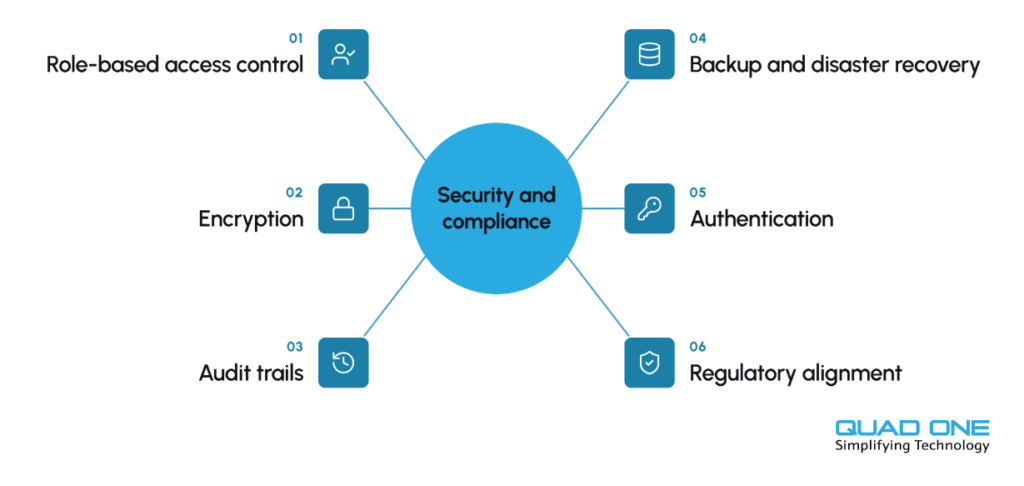
• Role-based access control: Staff see only what their role requires.
• Encryption: Data is protected in storage and in transit.
• Audit trails: Every view, edit and export is logged and traceable.
• Backup and disaster recovery: Regular backups and tested recovery plans protect continuity.
• Authentication: Strong passwords, multi-factor authentication and session timeouts reduce unauthorised access.
• Regulatory alignment: Depending on location, hospitals may need to comply with laws such as HIPAA in the United States, GDPR in the EU or India’s Digital Personal Data Protection Act, 2023.
Security also depends on people: regular staff training, clear data-handling policies and periodic security reviews matter as much as the software.
How to Choose the Right Hospital Information System for Your Hospital
Start with your workflows, not a feature list. Map how patients move through your hospital, identify the pain points, then evaluate vendors against those needs. Key criteria:
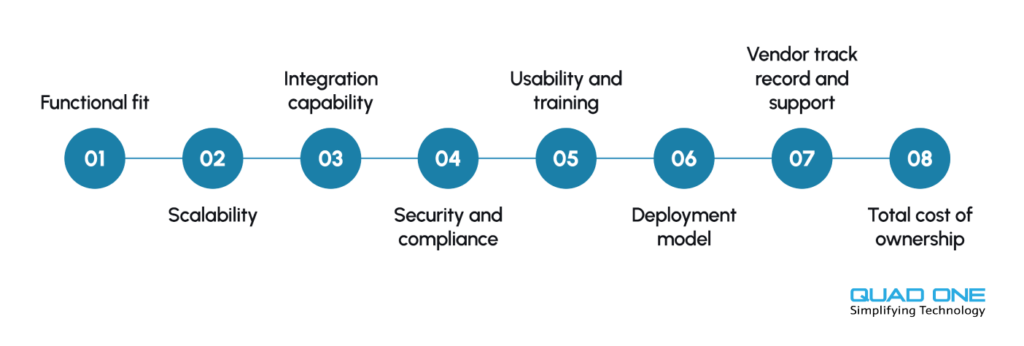
• Functional fit: Does it cover registration, OPD management, IPD management, diagnostics, pharmacy, billing and reporting for your specialties?
• Scalability: Can it support more beds, branches and users as you grow?
• Integration capability: Does it support HL7, FHIR and open APIs for your existing and future systems?
• Security and compliance: Does it meet the regulations that apply to you, with clear data ownership terms?
• Usability and training: Is the interface simple enough for busy clinicians, and what onboarding is provided?
• Deployment model: Does cloud, on-premise or hybrid suit your IT capacity and budget?
• Vendor track record and support: Ask for references from similar hospitals and check response commitments.
• Total cost of ownership: Compare licensing, implementation, customisation, support and upgrade costs over several years.
Request a live demonstration using your own scenarios, and involve doctors, nurses and billing staff in the evaluation.
If your hospital already uses an HIS but faces performance, integration or scalability challenges, our guide on how to upgrade a hospital information system explains the modernization process.
How QuadOne Connects HIS with Patient Engagement and Healthcare Technology
QuadoneEngage healthcare CRM works alongside existing HIS/HIMS platforms to manage patient inquiries, communication, follow-ups, and appointment booking through connected workflows.
A hospital information system manages what happens inside the hospital. Patient engagement covers what happens around it: how patients discover services, book visits, receive reminders, follow care instructions, and return. QuadOne approaches these as connected layers of healthcare technology rather than separate tools.
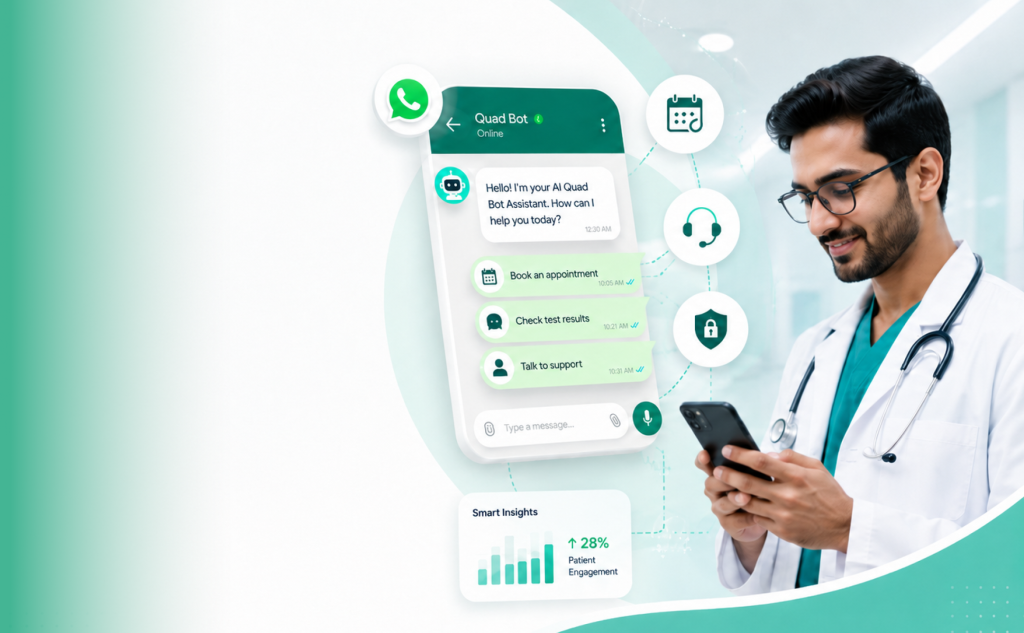
AI Hospital CRM and Quad Bot, a WhatsApp-based AI assistant, can extend engagement across the patient journey. With integration between the layers, hospitals can support activities such as:
• Appointment booking and reminders on channels patients already use
• Pre-visit instructions and post-discharge follow-up prompts
• Feedback collection and patient enquiry handling
• Health-check and recall campaigns based on visit history
The HIS remains the system of record for hospital operational and clinical data, and engagement tools use the relevant information to keep patients informed and connected. This division clarifies responsibilities, protects sensitive data, and gives hospital teams a complete view from first enquiry to long-term follow-up.
Connect Hospital Operations with Patient Engagement
See how QuadOneEngage integrates with your HIS to manage patient inquiries,
WhatsApp conversations, appointments, and follow-ups.
Conclusion
A Hospital Information System helps hospitals manage clinical, administrative, and financial operations through a connected platform. By integrating essential modules, automating workflows, and protecting patient information, an HIS improves operational efficiency, data accuracy, and care coordination. When integrated with healthcare CRM and other systems, it also supports better patient communication and engagement throughout the care journey. Choosing the right HIS enables hospitals to streamline operations, adapt to changing needs, and deliver a better patient experience.